Script Launchers and Python Setup
Setting up secure launchers for scripts like Python, Perl, and PHP.
Overview: Without Secure Script Launchers, every Python, Perl, or PHP script would share the interpreter’s permissions — if python3 is allowed to access the network, every Python script can access the network. Secure Script Launchers solve this by giving each script its own allowlist entry, so you control exactly what each script can do. The Dashboard presents this as Phase 3 when script interpreters are detected on the system.
In this section
Once launchers are configured (or skipped), the Dashboard directs you to Phase 4: File Access Allowlisting via the File Access queue ([f]) — see Allowlisting Basics.
1 - How Script Launchers Work
Explanation of Root Lock by HeartSuite’s secure script launchers and their security benefits.
Overview: Without Secure Script Launchers, every script run by an interpreter (Python, Perl, PHP) shares the interpreter’s permissions. If python3 is allowed to access the network, every Python script inherits that access. Secure Script Launchers solve this by giving each script its own allowlist entry.
Why allowlisting the interpreter is not enough
Interpreter programs (Python, PHP, Perl, Bash) execute code from files. When you allowlist python3, you grant permissions to the interpreter — and every script it runs inherits those permissions. A malicious Python script would have the same file and network access as your legitimate scripts.
graph LR
    subgraph without["Without launcher — interpreter is the unit of control"]
        P["python3\none allowlist entry"] --> SA["script_a.py"]
        P --> SB["script_b.py"]
        SA --> PA["network ✓  files ✓"]
        SB --> PB["network ✓  files ✓"]
    end

    subgraph with["With Secure Script Launcher — each script is the unit of control"]
        L["hs-python-launcher"] --> SA2["script_a.py\nown allowlist entry"]
        L --> SB2["script_b.py\nown allowlist entry"]
        SA2 --> PA2["network ✓"]
        SB2 --> PB2["no network ✗"]
    end
Per-script allowlist entries
Secure Script Launchers create a wrapper that applies the individual script’s allowlist entry instead of the interpreter’s:
- Each script is treated like a standalone program with its own permissions
- One script can have network access while another cannot
- Interpreters can be blocked entirely — only allowlisted scripts run
Using launchers
Root Lock by HeartSuite provides Secure Script Launchers for each supported interpreter (e.g., hs-python-launcher). Once activated via the Dashboard’s Launchers ([s]), every call to that interpreter automatically routes through the launcher — applying per-script permissions without any change to how you run scripts.
See Configuring Script Launchers for the activation steps.
2 - Configuring Script Launchers
How to activate per-script allowlisting for Python, Perl, and PHP interpreters.
Overview: An interpreter like Python, Perl, or PHP executes many different scripts — without additional control, a single allowlist entry for the interpreter applies to all of them equally. Secure Script Launchers identify the specific script being executed and apply a separate allowlist entry for it, giving each script its own file and network permissions. The Launchers ([s]) shows detected interpreters and activates launchers in one step.
Activating launchers
From the Dashboard, select Launchers ([s]). The Dashboard shows two sections:
- Script Launcher Status — how many interpreters were detected and how many launchers are pending activation
- Detected Interpreters — the list of interpreter paths found in the activity log, with their current launcher status
When launchers are pending, the Dashboard shows:
2 interpreter(s) found across 47 log event(s).
2 launcher(s) available but not yet activated.

[a] Activate   [s] Skip
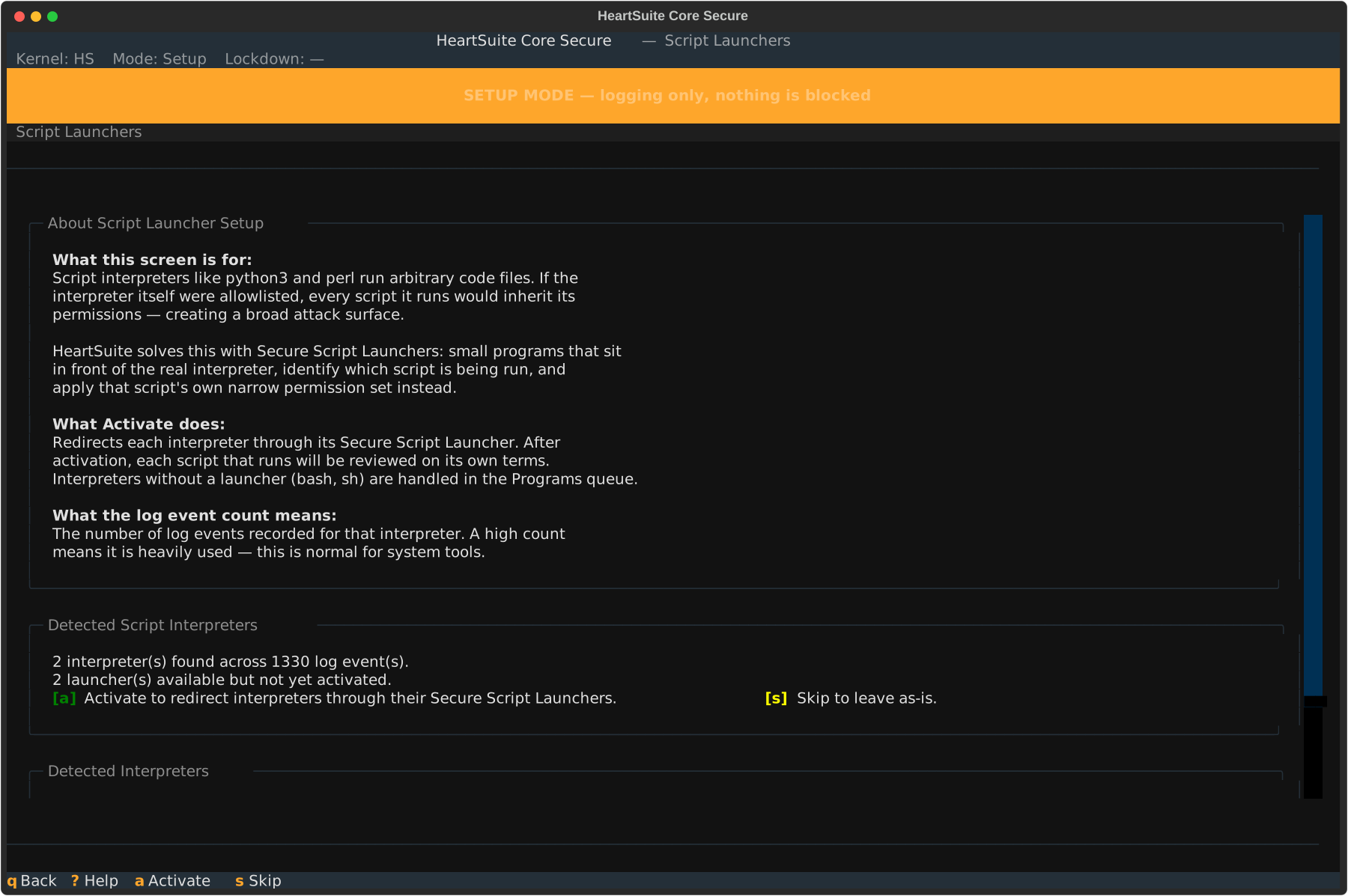
Press [a] to activate all pending launchers at once. Root Lock by HeartSuite registers each interpreter with its Secure Script Launcher — from this point forward, every call to that interpreter automatically routes through the launcher, applying per-script permissions.
After activation, the Dashboard confirms which launchers were activated:
Activated 2 Secure Script Launcher(s): python3, perl.
Each interpreter now routes through its launcher. Scripts using
these interpreters will be reviewed on their own permission terms.
Press [q] to return to the Dashboard. The Dashboard marks Phase 3 complete.
If no script interpreters are detected
If none of the known interpreters have appeared in the activity log yet, the Dashboard shows:
No script interpreter log events detected.
You may proceed to the next phase without activating any launchers.
Phase 3 is not required if your system does not use script interpreters.
Skipping launcher setup
Press [s] to skip without activating. Root Lock by HeartSuite notifies you:
Script launcher activation skipped.
Interpreters will remain blocked in Lockdown until approved.
You can return to the Launchers ([s]) at any time to activate launchers before activating Lockdown.
Testing a launcher directly
Before or after Dashboard activation, you can run a script through a specific launcher directly to verify it works under its own permissions:
# hs-python-launcher /path/to/your-script.py
This applies the script’s allowlist entry rather than the interpreter’s. Running the same script with python3 directly uses the interpreter’s broader permissions. This is useful for verifying per-script permissions in isolation before relying on them in Lockdown.
After activating launchers, return to the Dashboard — the Suggested Next Step directs you to Phase 4: File Access Allowlisting via the File Access queue ([f]).
3 - Included Script Launchers
List of available secure script launchers in Root Lock by HeartSuite.
Overview: Root Lock by HeartSuite ships with Secure Script Launchers for common interpreters. The Dashboard presents these during Phase 3 (if applicable) when the corresponding interpreters are detected on the system.
Available launchers
- Python 3 (
hs-python-launcher) - Python 2 (
hs-python2-launcher) - Perl (
hs-perl-launcher) - PHP (
hs-php-launcher)
For questions about launcher support for other interpreters, contact support@heartsecsuite.com.