HeartSuite Joint File System
HJFS gives each program its own files. A word processor can no longer open every document you own. Prototype documentation.
HeartSuite Joint File System | Prototype
Prototype: HJFS is under active development. Documentation reflects current design intent and is subject to change.
Overview: Every program you run gets full access to your files by default, including malware. HeartSuite Joint File System (HJFS) changes this at the filesystem layer.
Each program has its own storage area. No other program can read or write its files, including programs running as root. File isolation is per program and per version. No custom kernel is required.
Which programs run and which network connections they open stay with Root Lock by HeartSuite. On a Root Lock kernel, both can share the host. HJFS also runs on a standard unmodified kernel.
If execution or network control is the primary requirement, see Deployment scenarios — that job is Root Lock (or existing host controls on a stock kernel).
See it in action
Learn about HJFS
- Introduction and overview — Core concepts, design goals, and how HJFS differs from traditional file permission models.
- Architecture and compatibility — Technical implementation, OS support, and application compatibility notes.
- Advanced protection — An optional level that adds system-managed file dialogs and separates internal from user files, requiring application updates.
- Deployment scenarios — Where HJFS fits, where it sits beside Root Lock, and where another control owns the workload.
- How HJFS compares — What HJFS isolates, what it complements, and when to run it alone versus beside Root Lock.
- Attack examples — How HJFS is designed to confine a separate encryptor or a tainted version, and the residual when a program hurts files it already owns.
- Roadmap — Current prototype scope and planned development.
About this documentation
Covers HeartSuite Joint File System prototype.
1 - The OS still treats every program as you
File permissions are granted to users, not programs. HJFS isolates each program’s files on a stock kernel. Start here for the prototype.
HeartSuite Joint File System | Prototype
Overview: By default, every program you run gets full access to your files, including malware. HeartSuite Joint File System (HJFS) gives each program its own storage area, including programs running as root.
HJFS works on a standard Linux kernel. Which programs run and which network connections they open stay with Root Lock by HeartSuite. On a Root Lock kernel, both can share the host. HJFS also runs on a standard unmodified kernel.
In this section
- The security problem HJFS solves — Why default OS file permissions enable malware damage and how HJFS closes that gap.
- HJFS overview — Core mechanisms, per-version storage, secure file transfer, version management, and patents.
- Walkthrough — A short CLI example showing per-version isolation and rollback in action.
- Protection limits — Where the file isolation boundary holds, and what to use alongside it.
1.1 - Your word processor inherits every file you own
Malware encrypts your files with the same open() your editor uses. HJFS keeps custody with you, not with the program you ran.
Prototype: Content on this page reflects current design intent and will be updated as the product matures.
Overview: When you run a program, the OS grants it every file you can reach. A word processor and ransomware running as the same user have the same access.
HeartSuite Joint File System (HJFS) keeps file access with you, not with the program. Isolation is per program and per version, including as root.
The root cause
File permissions are granted to users, not to programs. That assumption is still the default. A word processor and a ransomware process running as the same user have identical access to every file that user owns.
Ransomware opens your files using the same system call as any legitimate program, reads them, encrypts them, and overwrites the originals. Backup restores a snapshot taken before the damage. Detection reacts after access was already granted, and only to attacks it already recognizes.
What HJFS changes
HJFS replaces user-based file permissions with program-based file permissions, enforced inside the filesystem. Each program has its own storage area. No other program can read or write those files, including programs running as root.
Which programs run and which network connections they open stay with Root Lock by HeartSuite. On a Root Lock kernel, both can share the host. See Protection limits.
1.2 - Each program gets its own storage area
HJFS confines programs to their own files. The OS default — every program inherits your documents — is the hole this closes.
Prototype: Content on this page reflects current design intent and will be updated as the product matures.
Overview: On a standard Linux system, any program can open any file you can reach, including programs running as root. HeartSuite Joint File System (HJFS) binds data files to the program version that created them.
No other program can read or write those files, regardless of privilege. Which programs run and which network connections they open stay with Root Lock by HeartSuite. See The security problem HJFS solves.
File isolation in practice
HJFS binds data files to the program that created them. A program can only reach files in its own storage area. That boundary holds even for programs running as root.
Malware present on the system cannot read, modify, or encrypt files that belong to another program. The open() call blocks the attempt before it reaches the data.
Technical implementation
HJFS moves file access enforcement out of the kernel’s user-permission model and into the filesystem itself. It consists of three parts:
- Additional code integrated into the filesystem’s
open() call — the function the OS invokes whenever a program opens a file. Access policy is enforced at that point. - Tools for installing and updating programs into the HJFS structure.
- A version selector that determines which program version is active when a program starts.
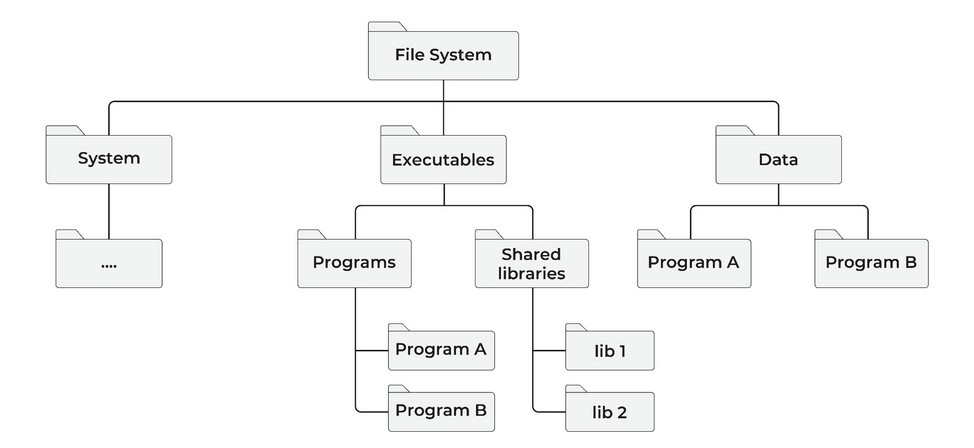
Executables are stored in a separate area. The open() modification marks that area read-only for all programs. Only the official HJFS installer has write access. Programs cannot modify or replace their own binaries.
HJFS operates entirely within the filesystem layer. A standard kernel is sufficient — no kernel modification is required.
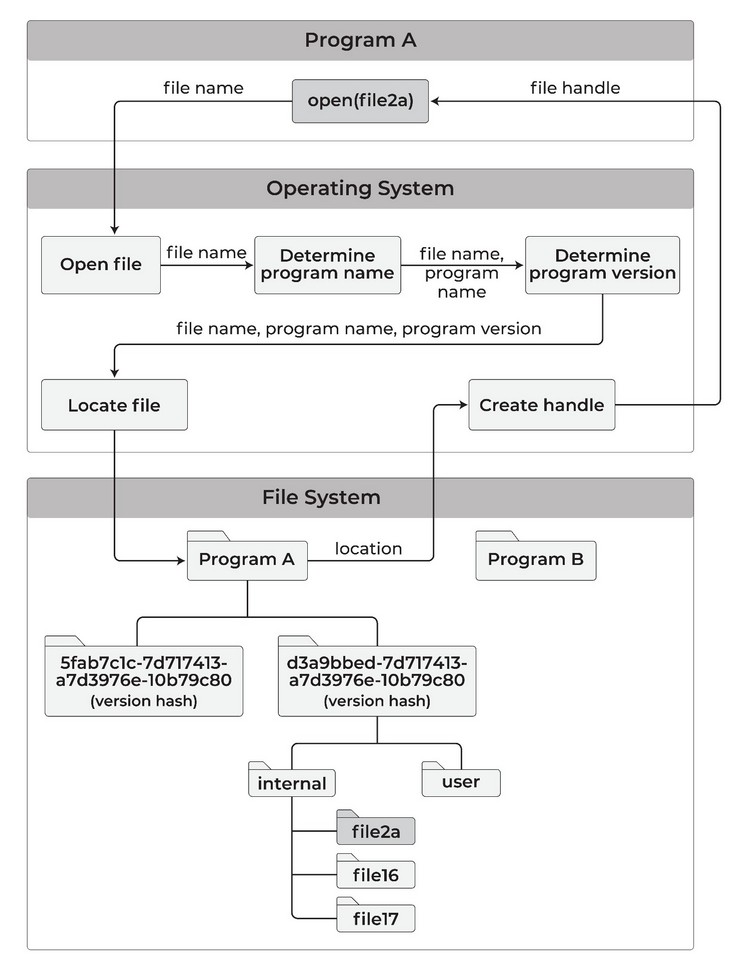
When a program opens a file, the modified open() call routes the request to that program’s isolated storage area:
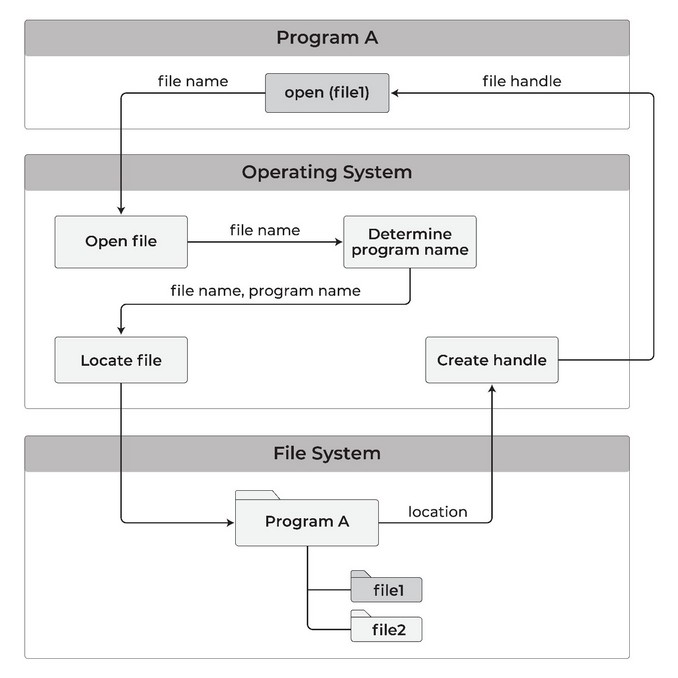
The restructured filesystem separates system files, executables, and per-program data into distinct top-level areas:
Per-version storage
HJFS enforces isolation at the version level, not just the program level. Each installed version of a program receives its own dedicated storage area.
HJFS trusts a program only with the storage area that version created. Storage areas belonging to other programs — or to other versions of the same program — are outside that trust boundary, even when the program runs as root.
Identity is the executable plus its libraries, hashed. A single library change is a new version. Utilities show a human-readable install-time identifier (for example, 260208_123022P); the hash is what HJFS enforces.
When a program opens a versioned file, the open() call resolves both the program name and the version hash before locating the file:
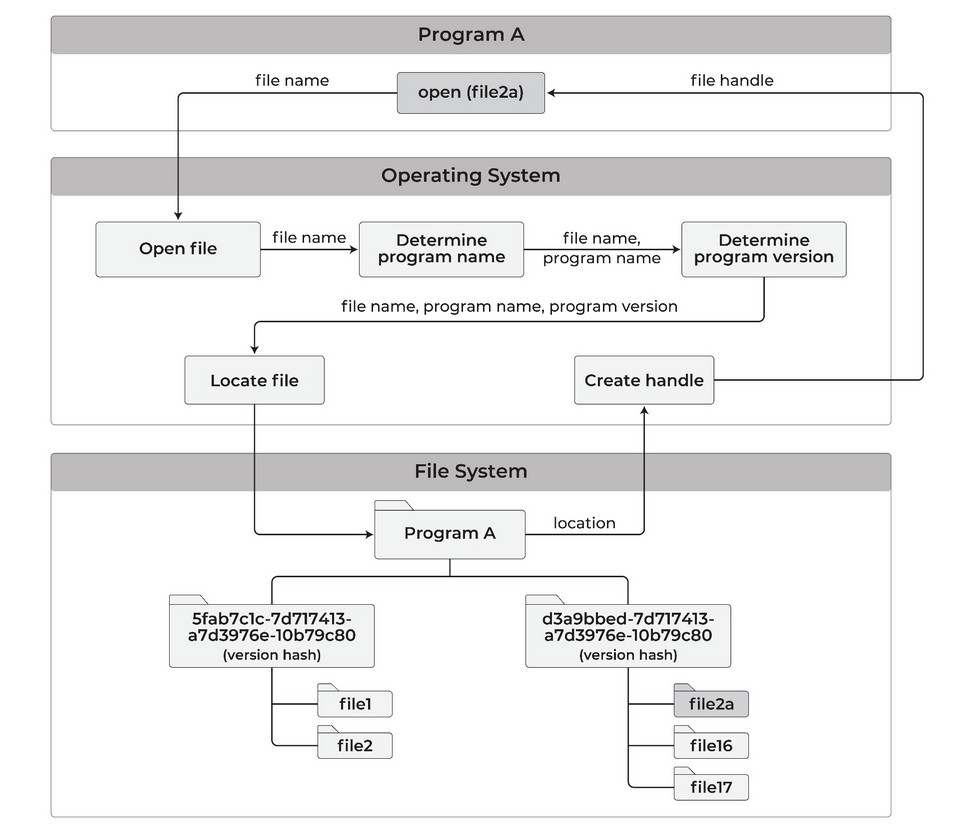
This means:
- When a program is updated, the new version gets its own storage area. The previous version’s binary, libraries, and data files remain intact.
- A malicious update cannot reach or destroy files created by earlier versions.
- Users can roll back to any previous version and read the original files exactly as they were.
Secure file transfer between programs
Because each program is confined to its own storage area, moving data between programs requires explicit user action:
- Copy utility: Copies a file from one program’s storage area directly to another’s. Every transfer is an explicit, auditable operation.
- Transfer area: A neutral staging location where a file can be deposited once and made available for other programs to read and copy to their own areas. Programs can read from the transfer area but cannot write to other programs’ areas directly.
- Clipboard: Copy and paste between programs requires your action. A program cannot do it without you.
Programs cannot permanently delete files. They can only move a file to trash. A separate utility shows trash contents and permanently deletes selected files after you confirm.
Version management
HJFS_update_program installs a new version. HJFS_version_manager lists installed versions, shows the active one, and sets it. The Walkthrough runs those commands.
Version rollback
Because each version has its own storage area, rolling back is non-destructive. Setting the active version to a prior release makes the original files immediately accessible — no restore process, no backup retrieval. Prior executables, libraries, and data files remain untouched in their own subareas.
Data files created under the version you roll back from exist only in that version’s storage area. The file transfer utility can copy them to the target version before or after rollback.
The example below shows a program called SimpleEdit after an update on November 12. The May 6 version is preserved in its own subarea; the installer stores the prior executables before overwriting the current ones:
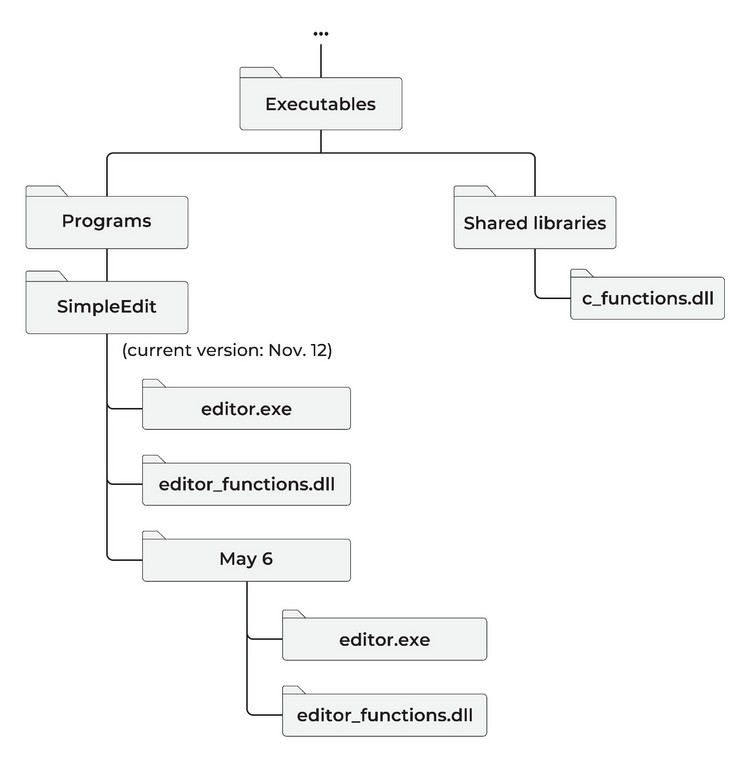
Automatic data file backup
HJFS automatically backs up every version of every data file to a protected storage area. No program can reach that area — including programs running as root. A restore utility shows every version of a file and restores any of them.
This is distinct from program version rollback. Program version rollback restores a prior executable and its libraries. Data file backup maintains version history of the data files themselves, independent of which program version created them.
HJFS automatic backup differs from Root Lock’s backup mechanism in two ways. Root Lock backs up admin-configured directories on every write — an administrator selects which directories are protected. HJFS backup requires no configuration: every data file written by any program is backed up automatically by the filesystem, covering every program’s storage area from first use.
The malicious sleeper attack
Program version isolation leaves a window. A malicious update can behave as expected for months before it activates. New data files accumulate inside that version’s storage area. Rolling back the program version leaves those files where they were written: they were never in the prior version’s area.
How the backup defeats it
HJFS copies every write to a protected area no program can open, including programs running as root. Ransomware targets backup first because intact backups remove the leverage of encryption. HJFS removes that option at the same open() boundary that isolates program storage.
When the attack activates:
- Stop the malicious program.
- Restore every data file to the version that existed before the attack.
- Copy those restored files to the prior legitimate program version’s storage area.
- Roll back the program version to the legitimate one.
Every file created before the attack is recoverable. Loss is limited to files written during the active attack, not the months the sleeper was dormant. See Attack examples for the XZ pattern.
Security guarantees
HJFS trusts each program only with the storage area that program version created. Root access stays inside the same storage area: privilege level does not expand what a program can open.
The trust boundary is enforced at the filesystem layer, below all running software. The only path around it is physical: removing the HJFS drive bypasses the enforcement entirely.
Patents
HJFS is based on innovations patented by HeartSuite:
| Patent | Title | Issued |
|---|
| US 11,822,699 B1 | Preventing Surreptitious Access to File Data by Malware | November 21, 2023 |
| US 11,983,288 B1 | Operating System Enhancements to Prevent Surreptitious Access to User Data Files | May 14, 2024 |
HJFS and Root Lock: what each covers
On a Root Lock kernel, HJFS and Root Lock can share the host. HJFS also runs on a standard unmodified kernel.
| Root Lock | HJFS |
|---|
| Enforcement layer | Kernel | Filesystem (open() call) |
| Kernel requirement | Modified Root Lock kernel | Standard kernel |
| Program execution control | Yes | No |
| Filesystem path control | Yes | Yes |
| Network access control | Yes | Planned |
| Per-program-version file isolation | No | Yes |
| Audited cross-program file transfer | No | Yes |
Which programs run and which network connections they open stay Root Lock’s domain. See How HJFS compares.
Status
HJFS is a prototype. Capabilities, configuration, and deployment details are subject to change.
1.3 - Where the file isolation boundary holds
Where HJFS file isolation holds, where a program can still hurt you inside its own area, and what to run alongside it.
Prototype: Content on this page reflects current design intent and will be updated as the product matures.
Overview: A compromised program can still hurt the files it already owns. HeartSuite Joint File System (HJFS) still keeps that program inside its own storage area, including as root.
No program can read or write files belonging to another. This page states where that boundary holds, and what handles the rest.
An attacker uses a compromised program within its own storage area
The scenario. An attacker gains control of a running program — through a vulnerability, a malicious update, or a backdoor compiled into an approved binary. The program is already running and has legitimate access to its own storage area.
What HJFS does. Files belonging to other programs are not reachable — not by name, not by path enumeration, not by any program. Damage stops at the compromised program’s own area.
Within that area, every write is automatically backed up to a protected location no program can access. Recovery is always available: the restore utility returns any file to any prior version, including versions created before the compromise.
What it does not cover. If the attacker reads sensitive data from the program’s own files and exfiltrates it over the network, this particular gate does not apply to the outbound connection. File isolation still holds: other programs’ files stay unreachable. Root Lock by HeartSuite closes the network gap. See Network exfiltration below.
Network exfiltration
The scenario. A compromised program reads data from its own storage area, then opens an outbound connection to an attacker-controlled server.
What HJFS does. The program can only reach files within its own storage area. Credentials, documents, and configuration files belonging to other programs are inaccessible. The data available for exfiltration is bounded by isolation.
What it does not cover. If a program holds data in its own storage area and has an open network path, this particular gate does not apply to that connection. The reachable set is still that program’s own files. Root Lock gates outbound destinations per program. See Root Lock.
Unauthorized program execution
The scenario. An attacker downloads a tool — a privilege escalation script, a credential dumper, a reverse shell — and attempts to run it.
What HJFS does. HJFS confines what a running program can open. Files belonging to other programs stay unreachable even if a new binary starts.
What it does not cover. If an attacker downloads a new binary and launches it, this particular gate does not apply to execution. Once it is running, HJFS still confines it to its own storage area. Root Lock requires any new binary to have an allowlist entry before it can execute. See Root Lock.
Sensitive data within a program’s own storage area
The scenario. A program stores credentials, API keys, or other secrets in its own data files. A malicious update to that program — or an attacker who has compromised it — reads those files.
What HJFS does. No other program can reach those files. The isolation is between programs, not between a program and its own data.
What it does not cover. If a malicious version of a program reads secrets stored in that program’s own files, this particular gate does not apply inside that area. Files belonging to other programs remain unreachable. Advanced protection further limits silent reads of user-facing files: those open only through an OS-mediated dialog. Internal files remain accessible to the program by name. See Advanced protection.
Physical access
Physical or serial-console access is the path that defeats HJFS file isolation. All software-based attempts to cross program storage boundaries are prevented at the filesystem layer.
The specific defeat path is removing the HJFS drive. Standard facility controls — locked racks, access logging, console IAM, physical security policies — are the appropriate countermeasure. File isolation still holds for every software path while the drive is present. See Security guarantees.
HJFS provides filesystem-level file isolation. Network monitoring, detection, and execution control address different layers and work alongside it.
| Adjacent domain | Complementary tool |
|---|
| Network exfiltration | Root Lock (kernel-level network allowlisting) or network-layer egress controls |
| Unauthorized program execution | Root Lock (kernel-level program allowlisting) |
| Detection within approved boundaries | SIEM, NDR, endpoint detection tools |
| Secrets management within a program | Secrets management tools; Advanced protection for user files |
On a Root Lock kernel, both can share the host. See HJFS and Root Lock: what each covers.
1.4 - Walkthrough: per-version isolation
Upgrade a program, keep v1’s data out of v2’s reach, roll back. A short CLI walkthrough of HJFS per-version isolation.
Prototype: Commands and output shown reflect the current prototype and may change.
Overview: Each installed version of a program has its own storage area. After an update, the new version cannot open files the old version created. Rolling back makes the old files available again — they were never copied into the new area.
See HJFS overview for why. This walkthrough is the CLI shape of that rule.
1. Check the installed program version
$ ./start_TinyDemo -V
TinyDemo v1.0
2. Write and read a data file under v1
The w flag writes text to a file; r reads it back. Both calls run as TinyDemo v1, so they share v1’s storage area.
$ ./start_TinyDemo w FileA
$ ./start_TinyDemo r FileA
The apple was a shiny red color.
3. Build and install a new version
$ ./make_TinyDemo-2.sh
$ ./HJFS_update_program TinyDemo TinyDemo TinyDemo.hash
List installed versions. The identifiers are install-time labels; HJFS enforces the hash.
$ ./HJFS_version_manager TinyDemo -l
260208_123022P  TinyDemo v1.0  (hash …)
260208_124510P  TinyDemo v2.0  (hash …)  [active]
4. v2 cannot read v1’s FileA
v2 is now active. FileA still exists in v1’s storage area. It is not in v2’s.
$ ./start_TinyDemo -V
TinyDemo v2.0
$ ./start_TinyDemo r FileA
FileA: not in this version's storage area
That miss is the isolation. A malicious update is a new hash, so it starts with an empty area and cannot open the prior version’s files. To give v2 a copy, use the file transfer utility — not open() from v2. See Secure file transfer.
5. Write FileA under v2
v2 can create its own FileA. That is a different file in a different area. v1’s copy is unchanged.
$ ./start_TinyDemo w FileA
$ ./start_TinyDemo r FileA
The pear was a dull green color.
6. Roll back to v1
Confirm the active version, then set it back to the first. Rollback does not copy or merge files. It makes v1’s area the one open() resolves.
$ ./HJFS_version_manager TinyDemo -c
260208_124510P  TinyDemo v2.0  [active]
$ ./HJFS_version_manager TinyDemo -s 260208_123022P
$ ./start_TinyDemo -V
TinyDemo v1.0
$ ./start_TinyDemo r FileA
The apple was a shiny red color.
v2’s pear is still in v2’s area. It is not gone; it is not visible while v1 is active. The file transfer utility can copy it across if you need it. See Version rollback.
2 - Where per-program file isolation fits
When HJFS alone is enough, when it should sit beside Root Lock, and when a different control is the right one for the workload.
Prototype: Content on this page reflects current design intent and will be updated as the product matures.
Overview: HeartSuite Joint File System (HJFS) isolates files per program on a stock kernel, including as root. Which programs run and which network connections they open stay Root Lock’s domain.
On a Root Lock kernel, both can share the host. HJFS also runs on a standard unmodified kernel.
Where HJFS fits
Desktop and workstation environments
The HJFS isolation model maps directly onto what desktop programs need: each program confined to its own storage area, with no path between them. A word processor cannot touch a browser’s files, and neither can reach files belonging to any other program.
With Advanced protection, user-facing documents are opened only through an OS-mediated dialog, so you choose which files each program can access.
Multi-user systems
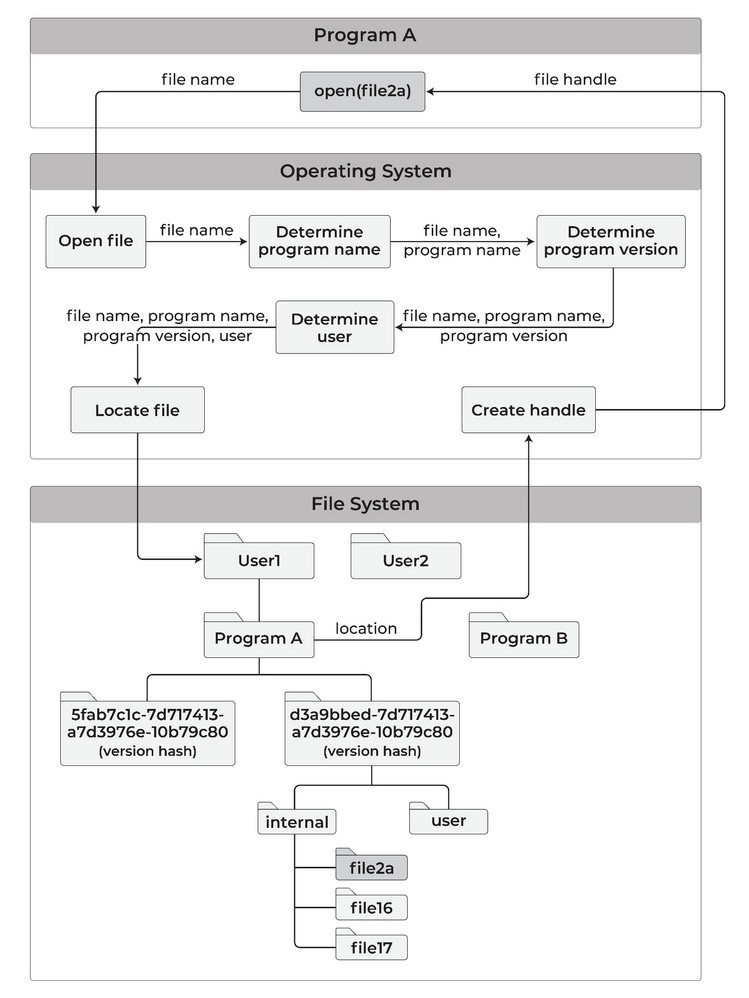
On systems with multiple user accounts, HJFS layers per-user isolation on top of per-program and per-version isolation. A program running under one user account cannot access files created by the same program under a different account. This separation is structural, not policy-based — the storage areas are physically distinct.
Software supply chain environments
Development, build, and CI systems are high-value targets for supply chain attacks. A tainted dependency or build tool update operates with the same trust as the legitimate version.
HJFS version isolation addresses this. When a program is updated, its prior version — including all its libraries and data files — is preserved in a separate storage area. A tainted update cannot access or destroy data created by the legitimate version. Rollback to the prior clean version is a single utility command, with no data loss.
Regulated environments
Healthcare, financial, legal, and government systems often require demonstrable data segregation — evidence that one program’s data cannot be accessed by another. HJFS provides this at the filesystem architecture level. The filesystem enforces program boundaries: no policy rule can be misconfigured to grant one program another’s files.
Standard-kernel environments
HJFS runs on a standard kernel — no kernel modification required. This makes it deployable where a modified or custom kernel is not permitted: cloud instances on AWS, Google Cloud, Azure, DigitalOcean, or Linode, systems subject to kernel certification requirements, and organisations with strict change-control policies around the kernel.
Alongside Root Lock by HeartSuite
HJFS and Root Lock address complementary layers. Root Lock controls program execution and network access at the kernel level. HJFS controls file read and write access at the filesystem level and adds per-version data isolation.
On that host they cover all three OS-level controls — file access, network communication, and program execution. See Protection limits.
Where another control owns the workload
Remote or cloud-only storage
HJFS isolates files at the local filesystem layer. Isolation on remote or cloud-hosted filesystems holds only where HJFS is running on the host that stores the data.
A client program accessing remote storage over a network connection is isolated on the local host. On the remote side, isolation holds only where HJFS is running. Network-level connection control for those programs is handled by Root Lock.
Environments needing execution or network control
Which programs can execute and which network connections they can open stay Root Lock’s domain. Where those controls are the primary requirement, use Root Lock, which enforces both at the kernel level.
HJFS can be added alongside it for filesystem-layer isolation. Per-program file isolation on a standard kernel still holds.
Windows and macOS
HJFS on Linux uses standard kernel filesystem registration — no special permissions or OS modifications required.
On Windows and macOS, registering a filesystem requires cooperation from Microsoft or Apple respectively. Linux is the current deployment target because that registration is a standard kernel operation there. Support for Windows and macOS is planned. File isolation on Linux still holds.
3 - HJFS on a stock kernel
How HJFS isolates files without replacing the kernel, which operating systems it targets, and how the prototype sits on the host filesystem.
Prototype: Content on this page reflects current design intent and will be updated as the product matures.
Overview: HeartSuite Joint File System (HJFS) isolates files inside the host filesystem on a stock kernel. Enforcement sits in the filesystem open() path, not in a custom kernel.
HJFS sits on an existing host filesystem. The current prototype implements the core file organization without modifying the host filesystem’s code directly.
Integration and vendor cooperation
HJFS integration involves two steps:
- FS source code integration: A minimal amount of HJFS source code is integrated into the file system’s
open() call. The scope of changes is small. - Kernel registration: The HJFS-modified file system must be registered with the kernel. On Linux, this is a standard operation. On Windows and macOS, it requires cooperation from Microsoft or Apple respectively. Kernel registration is planned for a subsequent release.
OS support
HJFS is designed to work on Linux, Windows, and macOS.
| Platform | Notes |
|---|
| Linux | Most straightforward path. Registering a modified file system with the kernel is a standard Linux operation. |
| Windows | More involved. Requires cooperation from Microsoft to register the HJFS-modified file system with the Windows kernel. |
| macOS | More involved. Requires cooperation from Apple to register the HJFS-modified file system with the macOS kernel. |
Partial deployment: portable HJFS drive
Adding an HJFS-formatted disk or USB drive to a Windows computer isolates programs installed on that drive. Files on the HJFS volume stay isolated per program. Programs on the rest of the computer stay on NTFS until NTFS itself is made HJFS compliant.
Application compatibility
HJFS basic protection requires only OS-level changes — not application changes. Existing application software runs unchanged for the vast majority of programs.
Applications hard-coded to access global system paths outside their own storage area (such as /usr or /proc) would need minor adjustments. The scope of such changes is expected to be small.
See Advanced protection for the level that does require application modifications, and what it adds in return.
Container compatibility
Containers running on an HJFS-compliant host filesystem benefit from the same per-program file isolation as native processes. Each containerized program is confined to its own storage area. Container orchestration and scheduling are unaffected.
Network access control
Root Lock by HeartSuite provides network access control today with kernel-level gating of outbound connections. On a Root Lock kernel, both can share the host.
HJFS network mediation is planned. File isolation on a standard kernel still holds without it. See Roadmap.
When that HJFS path ships, each new outbound connection requires explicit approval rather than a static list:
- Desktop: you approve each new connection through an OS confirmation dialog.
- Server: access is governed by pre-approved utilities or admin-defined policies, without per-action prompts.
Planned desktop path:
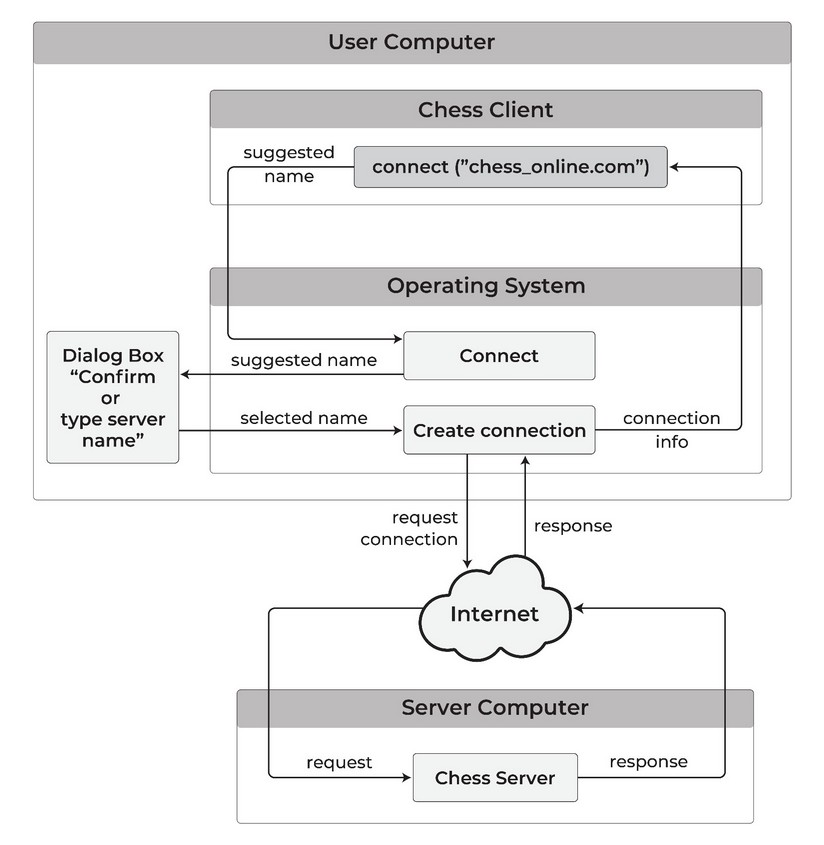
HJFS-compliant OS distributions disable the ability for a program to simulate user mouse clicks or keypresses in ordinary user sessions. Without this, a malicious program could simulate a user emptying the trash, approving a file open dialog, or confirming a network connection — faster than a user can observe or stop them.
Local deployment requirement
HJFS must run locally on every machine it protects. Remote or cloud storage alone leaves the client program on whatever filesystem that host uses.
HJFS applies file isolation at the filesystem layer on the local host. A program running on a machine without HJFS stays on that host’s native filesystem, regardless of where its data is stored. On a host where HJFS is present, that host’s local files stay isolated per program.
4 - The OS holds the file dialog, not the program
Advanced HJFS: separate internal and user files, OS-mediated dialogs, and export/import — so programs never hold custody of your documents.
Prototype: Content on this page reflects current design intent and will be updated as the product matures.
Overview: Under basic protection, malware stays in its own storage area but can still silently open your documents. Advanced protection holds the file dialog in the OS, not in the program.
HJFS provides two levels of protection:
| Protection level | OS changes | App changes | Description |
|---|
| Basic protection | Yes | No | Program and version isolation. All current HJFS v1.0 capabilities. |
| Advanced protection | Yes | Yes | Adds internal/user file separation and OS-mediated file access. Requires application updates. |
Basic protection runs existing software unchanged. Advanced protection builds on it and delivers stronger guarantees for user-facing data files. Applications must be updated to use the new OS functions.
Internal files and user files
Advanced protection subdivides each program’s per-version storage area into two types.
Internal files are managed directly by the program using file names. They are hidden from user utilities — they cannot be browsed, copied, or accessed outside the program that owns them. A spell-checker dictionary, a configuration file, or game state data are examples of internal files.
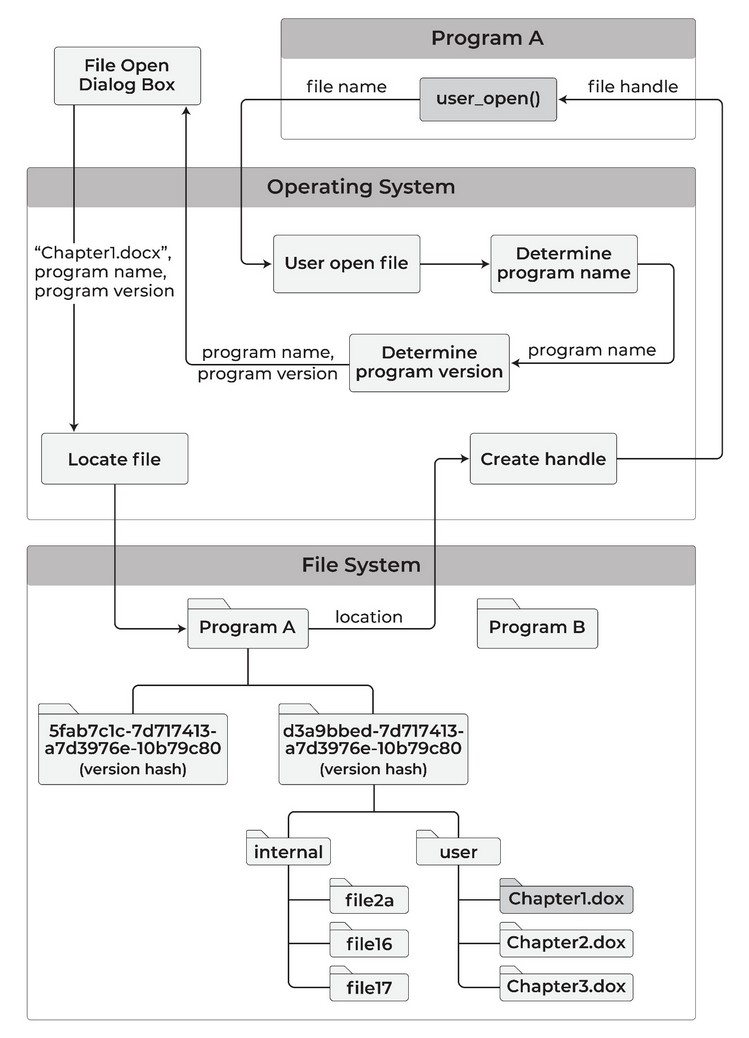
User files are the documents, spreadsheets, and images you work with. A program cannot open a user file by specifying its name. It invokes a system function that presents a standard OS file-selection dialog. You make the selection.
The OS opens the file and passes a file handle to the program — not a path. The program never learns the file’s location in the broader filesystem.
Malware cannot open user files without you. It must wait for you to open a file through the dialog. You can restrict that file to read-only for the program.
When you open a user file, a file-selection dialog appears. You pick the file; the OS resolves and opens it, passing only a handle to the program:
Exporting and importing data
Because internal files are hidden and user files require OS mediation, HJFS advanced protection provides two explicit system functions for moving data across the boundary:
Export: A program can write internal file data to a user file, making it available to you or to other programs. To prevent data mixing, no other user file may be open by the program during the export operation.
Import: A program can read from a user file and write the data into its internal files. This is the standard path for a program to accept externally supplied data — a document being opened for editing, for example.
Both functions are explicit, auditable, and user-initiated through the OS dialog.
Multiple users
On a multi-user system, each user’s storage is kept separate first. Within that per-user space, storage is divided by program. Within each program, storage is divided by version. Within each version, storage is split into internal and user subareas.
A program running as user X cannot access files created by user Y, even within the same program version.
Internal files that contain no user-specific data — shared configuration or reference data, for example — can be stored in a user-independent area accessible to all users of the program.
Programs are restricted to read-only access of such common files. That prevents one user’s program session from modifying data visible to another without the other user’s knowledge.
Advanced protection adds the internal/user file distinction on top of basic protection. Version isolation, per-program storage, secure file transfer, and automatic data file backup remain active.
5 - When ransomware cannot reach another program's files
How HJFS is designed to contain a separate ransomware binary or a tainted update’s files, and the residual when a program hurts files it already owns.
Prototype: The protections described on this page reflect HJFS design intent. HJFS is under active development. Incident facts below are taken from public reporting, not from HeartSuite exploitation tests.
Overview: When a program is compromised, damage usually spreads through every file that user can reach. HeartSuite Joint File System (HJFS) is designed to stop that spread at the compromised program’s storage area.
These incidents are here so the residual is visible.
Which programs run and which network connections they open stay with Root Lock by HeartSuite. On a Root Lock kernel, both can share the host. A program can still hurt files it already owns — see Protection limits.
WannaCry ransomware (CVE-2017-0144)
What happened. An SMB vulnerability let malware spread across networks and encrypt files on every system it reached. Over 200,000 systems across 150 countries were affected.
What the campaign needed. A new encryptor process that could open files belonging to other programs on the same host, plus a network worm path.
What HJFS does. Confine that encryptor to its own storage area. It cannot read or write files belonging to other programs, so encryption of those files stops at that boundary.
What it does not cover. If the encryptor already owns files in its own area, this particular gate does not apply to those files. Isolation still stops that process from opening another program’s files. Network spread stays with Root Lock. Automatic backup recovers files in the encryptor’s own area.
Log4Shell (CVE-2021-44228)
What happened. A remote code execution flaw in the Log4j library let attackers inject and run arbitrary code, then use that foothold to reach other systems.
What the campaign needed. Code running inside an already-trusted process, then a path from that process to other programs’ files or to the network.
What HJFS does. Keep injected code inside the exploited process’s storage area. No other program’s files are reachable from there. Version isolation lets the vulnerable library be identified and rolled back without touching data from other versions.
What it does not cover. If the RCE runs inside an already-trusted process, this particular gate does not stop the RCE. Isolation still stops that process from opening another program’s files. Outbound callbacks stay with Root Lock. Secrets already in that process’s own files remain readable by it.
SolarWinds supply chain attack
What happened. A tainted software update carried a backdoor that gave attackers persistent access for exfiltration and espionage over months. Roughly 18,000 organisations were affected, including multiple US federal agencies.
What the campaign needed. A new binary (or a new version of a trusted binary) that could still open files written by the legitimate version, plus months of quiet access.
What HJFS does. Identify program versions by cryptographic hash, so the tainted update gets its own isolated storage area — separate from the legitimate version’s data. Roll back to a prior verified version. Data written under the legitimate version stays in that version’s storage area.
What it does not cover. If data was written while the tainted version was active, this particular gate does not pull those files back. Isolation still keeps that version out of the legitimate version’s files. Automatic backup is the path for that window — see The malicious sleeper. Network exfiltration from the backdoor’s own files stays with Root Lock.
Colonial Pipeline ransomware
What happened. Compromised credentials gave attackers the access they needed to deploy ransomware that encrypted operational data and forced a six-day shutdown of the largest fuel pipeline in the United States.
What the campaign needed. Either a new encryptor binary that could open operational files, or encryption from inside the programs that already owned those files.
What HJFS does. If the encryptor is a separate program, it cannot reach files belonging to other programs.
What it does not cover. If encryption ran inside the operational software that already owned those files, this particular gate does not apply — that is a program hurting files it already owns. Isolation still stops a separate encryptor from opening those files. Credential theft and lateral movement stay with Root Lock.
MOVEit Transfer (CVE-2023-34362)
What happened. SQL injection in a managed file transfer application enabled mass data theft and encryption. Over 2,000 organisations across government, healthcare, and financial sectors were affected.
What the campaign needed. Code running inside the file-transfer application that already stored the files being stolen.
What HJFS does. A secondary encryptor spawned as a different program still cannot open files it does not own.
What it does not cover. If theft runs inside MOVEit itself, this particular gate does not hide a program’s files from itself. See Sensitive data within a program’s own storage area. A secondary encryptor still cannot open files it does not own.
XZ Utils supply chain attack (CVE-2024-3094)
What happened. A patient attacker spent approximately two years as a trusted contributor to the XZ Utils open-source compression library, gradually building commit access before inserting a backdoor in versions 5.6.0 and 5.6.1.
The backdoor was designed to allow unauthorized SSH authentication on affected systems. It was discovered in March 2024 weeks before reaching stable Linux distributions.
What the campaign needed. A new library hash (a new HJFS version) plus a path from that version to prior data, or to SSH authentication.
What HJFS does. The backdoored library version carries a different cryptographic hash than the prior legitimate release, so HJFS installs it into its own storage area. Data files created under the legitimate version stay there — the backdoored version cannot reach them. Roll back to the prior verified version.
This is the malicious sleeper pattern HJFS automatic data-file backup is designed to close for files written during the backdoored version’s life. Even if that version had been dormant for months, writes from that period remain in the protected backup area. No program, including the backdoored version, can open that area.
What it does not cover. If the backdoor’s job is unauthorized SSH authentication, this particular gate does not apply to execution and network. Isolation still keeps the backdoored version out of the legitimate version’s files. Those dimensions stay with Root Lock.
Change Healthcare ransomware (2024)
What happened. The ALPHV/BlackCat ransomware group breached Change Healthcare, a clearinghouse processing a large share of US patient healthcare claims. The February 2024 attack disrupted healthcare billing and payment processing across the United States for weeks.
UnitedHealth Group disclosed that approximately 190 million individuals had data affected.
What the campaign needed. Either a new encryptor that could open billing and patient files, or encryption from inside the programs that already stored them.
What HJFS does. A separate ransomware binary cannot enumerate or encrypt files belonging to other programs.
What it does not cover. If patient records live in the billing stack’s own files, this particular gate does not hide them from a compromised billing program. Isolation still stops a separate ransomware binary from opening those files. See Protection limits.
6 - What HJFS isolates — and what it complements
Per-program file isolation on a stock kernel, the tools that own execution and network, and when to run HJFS alone versus beside Root Lock by HeartSuite.
Prototype: Content on this page reflects current design intent and will be updated as the product matures.
Overview: Every program on a Linux system can, by default, read any file you own, execute any binary it can reach, and open any network connection — and so can any malware running under that user.
HeartSuite Joint File System (HJFS) addresses one of these three OS-level controls: file read and write access is restricted per program and per version, including as root. Which programs run and which network connections they open stay with Root Lock by HeartSuite. On a Root Lock kernel, both can share the host.
Root Lock and HJFS: two approaches
Three OS-level controls are unrestricted by default on Linux: file access, network communication, and program execution.
Root Lock and HJFS share the same goal: closing all three. They do it in different ways.
Root Lock is production-ready today. It works with the existing Linux OS: you configure allowlist entries, tighten them down, and enable Lockdown. With Lockdown enabled, only explicitly permitted programs, files, and network destinations are allowed. Everything else is blocked.
HJFS redesigns the file access layer from the ground up. Every program is confined to its own private storage area at the filesystem level. Prior versions of programs are preserved automatically before any update overwrites them. Cross-program file access is architecturally impossible, not policy-dependent.
Network access mediation and OS-mediated user-file access are planned for subsequent releases.
| Aspect | Root Lock | HJFS | What this means in practice |
|---|
| File isolation | Global filesystem; you add allowlist entries for directories and paths (commonly /usr/lib, /etc, /home) | Per-program isolated storage area; the filesystem blocks any overlap | An allowlist entry that is too wide can share files across programs. HJFS has no overlap path. |
| Handling malicious updates | No automatic program versioning. Data backup applies only to admin-configured directories (default: /home) | Per-version isolation: prior executable and libraries are preserved automatically before any update overwrites them | HJFS keeps the clean version of a program (for example, a tainted sshd) in its own area. Root Lock restores a prior binary if it was backed up. |
| Network and user-file access | Allowlist entries set once; no per-action prompts | OS-mediated access planned: approval on desktops, policy rules on servers (v1.0 ships file isolation) | Root Lock handles network and user-file access today via static allowlist entries. HJFS v1.0 isolates files; OS-mediated network and user-file access is on the roadmap. |
| Executables and updates | Standard Linux paths; updates often require switching to Setup Mode | Separate read-only area for executables; only the official HJFS installer can write to it | HJFS keeps executables in a read-only area. Root Lock uses Setup Mode for updates. |
| Data sharing and deletion | Any program can read, write, or delete anything its allowlist entry permits | Cross-program transfers require an explicit copy utility; programs can only move files to trash, not permanently delete them | HJFS makes cross-program copies explicit. Root Lock permits whatever the allowlist entry names. |
| Lockdown | Dashboard Lockdown ([l]); chattr +i seals key files | Enforced by the filesystem structure — no separate Lockdown step required | Root Lock seals the allowlist. HJFS isolation is the filesystem layout. |
For production deployments today
Root Lock is production-ready for Linux servers. Tight allowlist configuration, Lockdown enabled, and restricted backup directories provide strong real-world protection with existing software.
HJFS eliminates entire risk classes — cross-program file leakage, malicious updates reaching prior-version data, programs permanently deleting files — by design, without depending on correct admin configuration. It runs on a standard unmodified kernel.
Network access mediation and execution control are planned for subsequent releases, so for those controls today, use Root Lock; on a Root Lock kernel, both can share the host.
What HJFS is
HJFS is per-program file isolation on a standard unmodified kernel. Each program has its own storage area, including as root. Which programs run and which network connections they open stay with Root Lock.
Network. Which connections a program can open is Root Lock’s domain. Isolation still limits what data is reachable — a confined program can only read its own files. See Network exfiltration.
Execution. Which programs may start is Root Lock’s domain. A binary placed on the system can be launched, but HJFS still confines what it can access once it runs. See Unauthorized program execution.
Encryption. Files within a program’s storage area are readable by that program in plaintext, because isolation controls which programs can reach a file, not how it is stored. Use standard disk or volume encryption alongside HJFS for encryption at rest.
Permissions. Standard OS permissions are user-based: they answer “can this user read this file?” HJFS is program-based: it answers “did this program create this file?” The two operate at different levels and are complementary.
Backup. HJFS automatically backs up every data file each time it is written, to a protected area no program can access. This provides fine-grained version history for ransomware recovery and rollback. Off-site backup, disaster recovery, and compliance-driven backup management stay with dedicated backup infrastructure.
Detection. For behavioural detection, fleet correlation, and incident response, SIEM and NDR tools remain the right answer and should run alongside HJFS.
What HJFS complements
| Adjacent domain | Complementary control |
|---|
| Network connections — which destinations a program can reach | Root Lock on a Root Lock kernel, or network-layer egress controls on a stock kernel |
| Program execution — which binaries are permitted to run | Root Lock on a Root Lock kernel, or existing host execution controls on a stock kernel |
| Detection and alerting on suspicious behaviour | SIEM, NDR, endpoint detection tools |
| Secrets isolation within a single program’s own storage area | Secrets management tools; Advanced protection for user files |
| Encryption of data at rest | Standard disk or volume encryption |
| Off-site backup and disaster recovery | Dedicated backup infrastructure |
HJFS covers file read and write access at the filesystem layer, per program and per version. Root Lock covers network communication and program execution at the kernel layer.
HJFS alone, and on a Root Lock kernel
HJFS alone fits deployments where the primary risk is lateral file access across programs, data destruction by ransomware, or supply chain updates that taint data created by prior versions. It runs on a standard kernel — cloud instances with a provider-managed kernel, systems under kernel certification, or organisations that keep a stock kernel.
Network and execution control on that host stay with existing tooling: egress filtering, separate allowlisting, or whatever is already in place.
On a Root Lock kernel both can share the host: Root Lock for execute and network, HJFS for per-program file isolation and versioning.
Positioning relative to common security categories
| Category | Does HJFS apply? | Notes |
|---|
| Ransomware containment | Yes — primary use case | Ransomware confined to its own area cannot touch files belonging to other programs |
| Supply chain / tainted update | Yes — primary use case | Tainted update receives isolated storage; rollback is a single command |
| Lateral file access between programs | Yes | Structural isolation, not policy-based |
| Network exfiltration | Partial | Limits what data is reachable. Which connections a program can open is Root Lock’s domain. |
| Unauthorized program execution | Complementary | Which programs may start is Root Lock’s domain. File isolation still holds for whatever runs. |
| Privilege escalation | Complementary | Privilege stays Root Lock’s domain. Program storage boundaries still hold. |
| Detection and alerting | Complementary | Use SIEM/NDR alongside |
| Data encryption at rest | Complementary | Use standard disk encryption |
How HJFS can be circumvented. HJFS file isolation operates at the filesystem layer, below any running software. No program — regardless of privilege — can cross program storage boundaries while HJFS is present.
The one path around it is physical or serial-console access: an attacker who can remove the HJFS drive removes the isolation layer. Standard physical and console controls apply. See Security guarantees.
7 - What the HJFS prototype covers today
Current HeartSuite Joint File System prototype scope, what the first cut includes, and what is planned next.
Prototype: HJFS is under active development.
Current capabilities
| Capability | Notes |
|---|
| Per-program file isolation | open() interception — programs are confined to their own storage area |
| Per-version storage | Each installed program version receives its own isolated storage area |
| Version rollback | Non-destructive — prior versions and their data remain intact |
| Secure file transfer | Copy utility and transfer area for explicit cross-program data movement |
| Trash-only deletion | Programs cannot permanently delete files. Permanent deletion requires explicit user action through a separate utility |
| Automatic data file backup | Every data file version is backed up to a protected area inaccessible to ordinary programs |
| Version management utilities | HJFS_update_program and HJFS_version_manager |
HJFS implements core file organization with the host file system code left unchanged — enabling deployment on standard, unmodified kernels. See Architecture and compatibility for details.
Planned
Next release
| Item | Notes |
|---|
| FS source code integration | Integrates minimal HJFS source code into the host file system’s open() call. Required for production deployment |
| Kernel registration | Registers the HJFS-modified file system with the kernel. Requires FS vendor cooperation on non-Linux platforms |
Subsequent releases
| Item | Notes |
|---|
| Network access control | New outbound connections are mediated by the OS. Desktop deployments prompt the user for confirmation; server deployments apply policy rules |
| Python script compartmentalization | Confines individual Python scripts to separate file spaces. Scripts no longer share the interpreter’s storage area. Requires a small amount of kernel cooperation |
| Advanced protection | Separates internal and user files and introduces OS-mediated file dialogs. Requires application updates. See Advanced protection for design details |