Prototype: Content on this page reflects current design intent and will be updated as the product matures.
Overview: On a standard Linux system, any program can open any file you can reach, including programs running as root. HeartSuite Joint File System (HJFS) binds data files to the program version that created them.
No other program can read or write those files, regardless of privilege. Which programs run and which network connections they open stay with Root Lock by HeartSuite. See The security problem HJFS solves.
File isolation in practice
HJFS binds data files to the program that created them. A program can only reach files in its own storage area. That boundary holds even for programs running as root.
Malware present on the system cannot read, modify, or encrypt files that belong to another program. The open() call blocks the attempt before it reaches the data.
Technical implementation
HJFS moves file access enforcement out of the kernel’s user-permission model and into the filesystem itself. It consists of three parts:
- Additional code integrated into the filesystem’s
open()call — the function the OS invokes whenever a program opens a file. Access policy is enforced at that point. - Tools for installing and updating programs into the HJFS structure.
- A version selector that determines which program version is active when a program starts.
Executables are stored in a separate area. The open() modification marks that area read-only for all programs. Only the official HJFS installer has write access. Programs cannot modify or replace their own binaries.
HJFS operates entirely within the filesystem layer. A standard kernel is sufficient — no kernel modification is required.
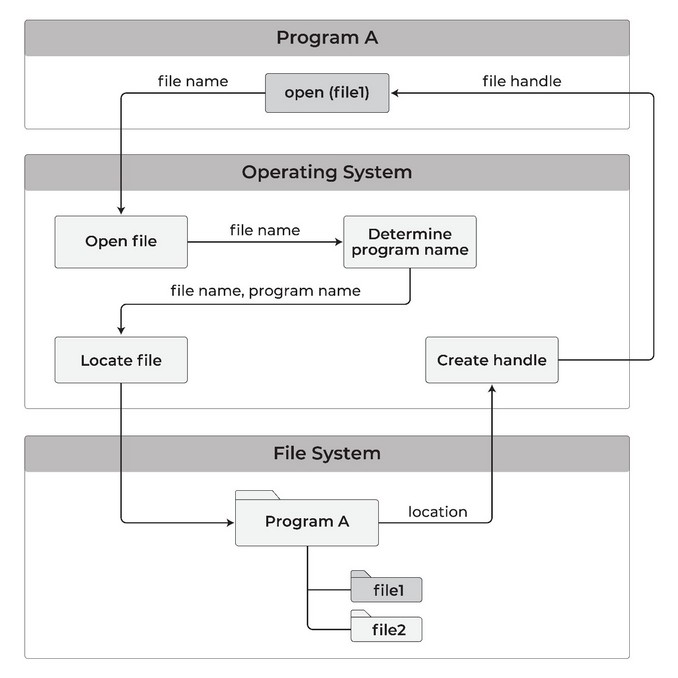
When a program opens a file, the modified open() call routes the request to that program’s isolated storage area:
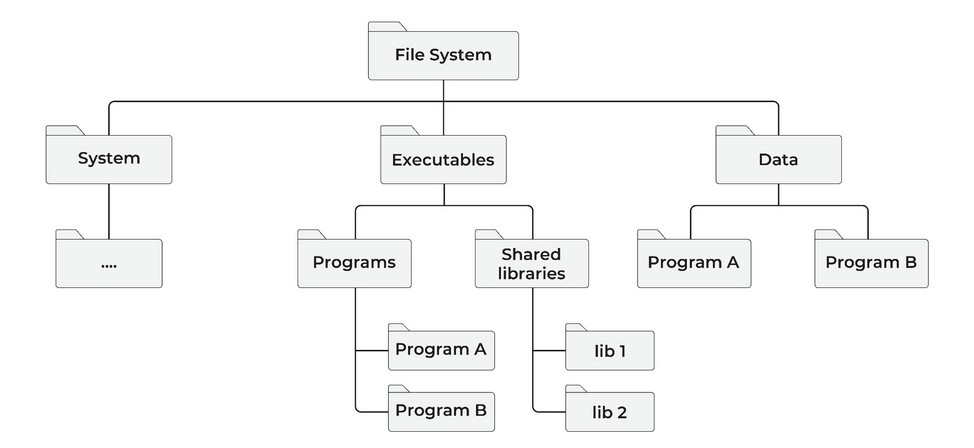
The restructured filesystem separates system files, executables, and per-program data into distinct top-level areas:
Per-version storage
HJFS enforces isolation at the version level, not just the program level. Each installed version of a program receives its own dedicated storage area.
HJFS trusts a program only with the storage area that version created. Storage areas belonging to other programs — or to other versions of the same program — are outside that trust boundary, even when the program runs as root.
Identity is the executable plus its libraries, hashed. A single library change is a new version. Utilities show a human-readable install-time identifier (for example, 260208_123022P); the hash is what HJFS enforces.
When a program opens a versioned file, the open() call resolves both the program name and the version hash before locating the file:
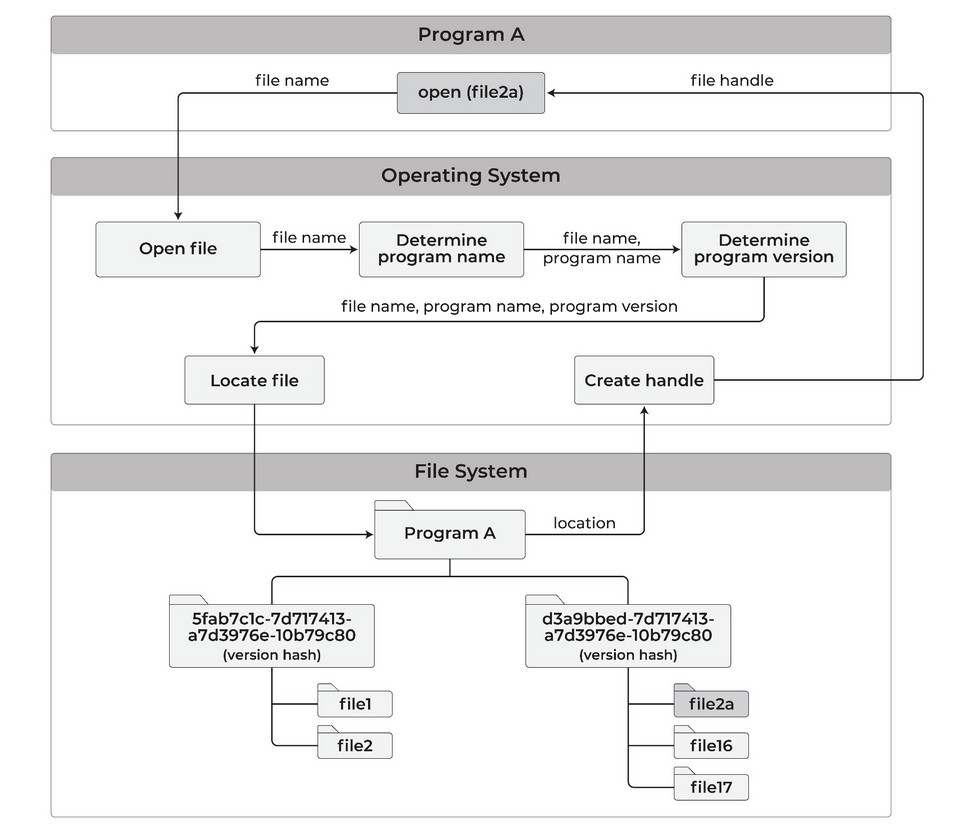
This means:
- When a program is updated, the new version gets its own storage area. The previous version’s binary, libraries, and data files remain intact.
- A malicious update cannot reach or destroy files created by earlier versions.
- Users can roll back to any previous version and read the original files exactly as they were.
Secure file transfer between programs
Because each program is confined to its own storage area, moving data between programs requires explicit user action:
- Copy utility: Copies a file from one program’s storage area directly to another’s. Every transfer is an explicit, auditable operation.
- Transfer area: A neutral staging location where a file can be deposited once and made available for other programs to read and copy to their own areas. Programs can read from the transfer area but cannot write to other programs’ areas directly.
- Clipboard: Copy and paste between programs requires your action. A program cannot do it without you.
Programs cannot permanently delete files. They can only move a file to trash. A separate utility shows trash contents and permanently deletes selected files after you confirm.
Version management
HJFS_update_program installs a new version. HJFS_version_manager lists installed versions, shows the active one, and sets it. The Walkthrough runs those commands.
Version rollback
Because each version has its own storage area, rolling back is non-destructive. Setting the active version to a prior release makes the original files immediately accessible — no restore process, no backup retrieval. Prior executables, libraries, and data files remain untouched in their own subareas.
Data files created under the version you roll back from exist only in that version’s storage area. The file transfer utility can copy them to the target version before or after rollback.
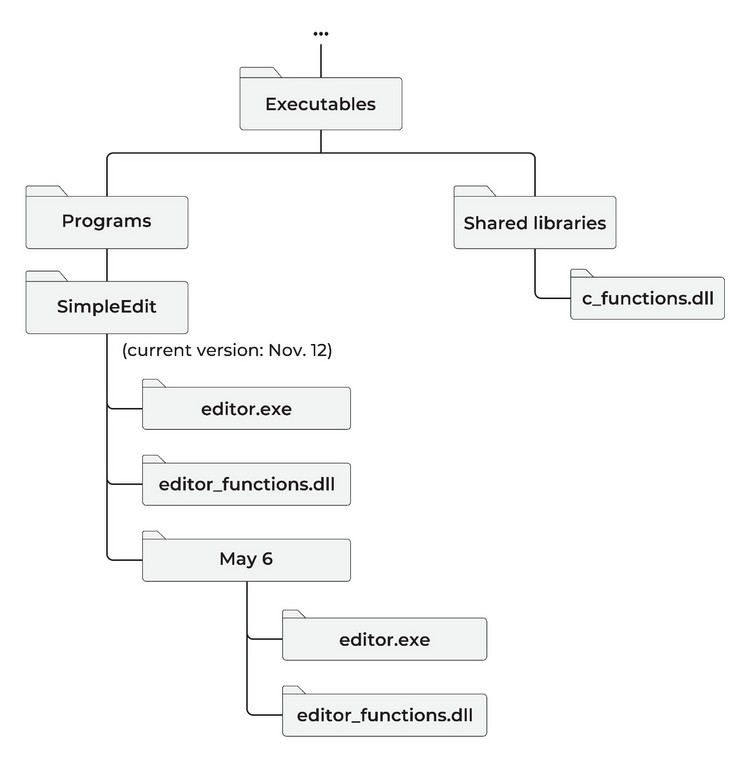
The example below shows a program called SimpleEdit after an update on November 12. The May 6 version is preserved in its own subarea; the installer stores the prior executables before overwriting the current ones:
Automatic data file backup
HJFS automatically backs up every version of every data file to a protected storage area. No program can reach that area — including programs running as root. A restore utility shows every version of a file and restores any of them.
This is distinct from program version rollback. Program version rollback restores a prior executable and its libraries. Data file backup maintains version history of the data files themselves, independent of which program version created them.
HJFS automatic backup differs from Root Lock’s backup mechanism in two ways. Root Lock backs up admin-configured directories on every write — an administrator selects which directories are protected. HJFS backup requires no configuration: every data file written by any program is backed up automatically by the filesystem, covering every program’s storage area from first use.
The malicious sleeper attack
Program version isolation leaves a window. A malicious update can behave as expected for months before it activates. New data files accumulate inside that version’s storage area. Rolling back the program version leaves those files where they were written: they were never in the prior version’s area.
How the backup defeats it
HJFS copies every write to a protected area no program can open, including programs running as root. Ransomware targets backup first because intact backups remove the leverage of encryption. HJFS removes that option at the same open() boundary that isolates program storage.
When the attack activates:
- Stop the malicious program.
- Restore every data file to the version that existed before the attack.
- Copy those restored files to the prior legitimate program version’s storage area.
- Roll back the program version to the legitimate one.
Every file created before the attack is recoverable. Loss is limited to files written during the active attack, not the months the sleeper was dormant. See Attack examples for the XZ pattern.
Security guarantees
HJFS trusts each program only with the storage area that program version created. Root access stays inside the same storage area: privilege level does not expand what a program can open.
The trust boundary is enforced at the filesystem layer, below all running software. The only path around it is physical: removing the HJFS drive bypasses the enforcement entirely.
Patents
HJFS is based on innovations patented by HeartSuite:
| Patent | Title | Issued |
|---|---|---|
| US 11,822,699 B1 | Preventing Surreptitious Access to File Data by Malware | November 21, 2023 |
| US 11,983,288 B1 | Operating System Enhancements to Prevent Surreptitious Access to User Data Files | May 14, 2024 |
HJFS and Root Lock: what each covers
On a Root Lock kernel, HJFS and Root Lock can share the host. HJFS also runs on a standard unmodified kernel.
| Root Lock | HJFS | |
|---|---|---|
| Enforcement layer | Kernel | Filesystem (open() call) |
| Kernel requirement | Modified Root Lock kernel | Standard kernel |
| Program execution control | Yes | No |
| Filesystem path control | Yes | Yes |
| Network access control | Yes | Planned |
| Per-program-version file isolation | No | Yes |
| Audited cross-program file transfer | No | Yes |
Which programs run and which network connections they open stay Root Lock’s domain. See How HJFS compares.
Status
HJFS is a prototype. Capabilities, configuration, and deployment details are subject to change.